
Slices
Cross-section slices let you visualize velocity and pressure fields inside your simulation domain.
Upgrade PlanVortices (Q-Criterion)
Vortices (Q-Criterion) reveal coherent flow structures and vortex cores, colored by velocity, inside your simulation domain.
Upgrade Plan


Elements
Rotating Objects:
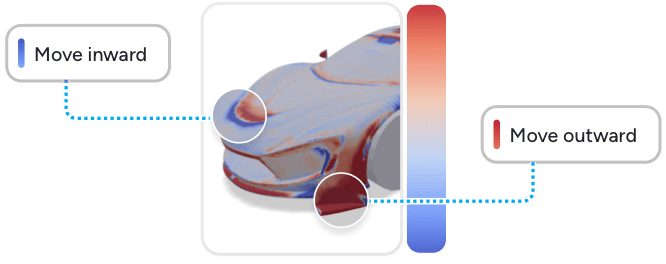
Uncover Design Improvements
-
Design Advice uses physics-based equations to understand which areas affect lift or drag the most.
-
The resulting color tells you where & how to change the topology of your design to increase performance
Design Advice
Additional "adjoint" simulation showing how to improve your design yourself.
Design Advice and Morphing mesh with a uniform boundary-layer setup tuned for adjoint stability. Near-wall results may differ slightly from standard simulations.
Uncover Design Improvements
-
Design Advice uses physics-based equations to understand which areas affect lift or drag the most.
-
The resulting color tells you where & how to change the topology of your design to increase performance
Design Advice Unavailable
Design advice visuals are not available for this simulation. Please contact us at info@airshaper.com
Report
Detailed aerodynamic report with forces, coefficients, and visualizations. Available on paid plans.
Upgrade PlanCompare
Visually compare two simulations side-by-side with synced cameras, shared controls and delta metrics. Available on Enterprise plans.
Upgrade Plan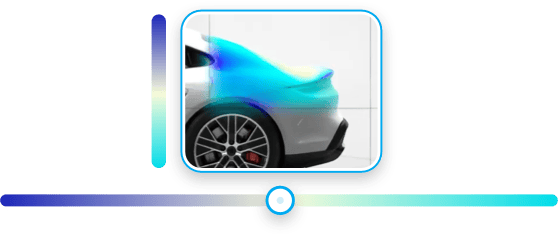
Optimize Your Designs Effortlessly
-
Morphing speeds up the process and allows for quicker exploration of design possibilities without manual intervention.
-
Our intelligent algorithms provide actionable insights to optimize your designs effortlessly.
Morphing
Our algorithms will automatically morph your 3D model for less drag, more lift, etc.
Design Advice and Morphing mesh with a uniform boundary-layer setup tuned for adjoint stability. Near-wall results may differ slightly from standard simulations.
Transient
Time-resolved animations of your flow — vortex shedding, surface pressure fluctuations and unsteady wakes.
Upgrade PlanAI Analysis
Let AI inspect your flow results and highlight the key drag and performance problems as 3D annotations on your model.
Uncover Design Improvements
-
Design Advice uses physics-based equations to understand which areas affect lift or drag the most.
-
The resulting color tells you where & how to change the topology of your design to increase performance
Design Advice
Additional "adjoint" simulation showing how to improve your design yourself.
Design Advice and Morphing mesh with a uniform boundary-layer setup tuned for adjoint stability. Near-wall results may differ slightly from standard simulations.
Report
Detailed aerodynamic report with forces, coefficients, and visualizations. Available on paid plans.
Upgrade Plan
Optimize Your Designs Effortlessly
-
Morphing speeds up the process and allows for quicker exploration of design possibilities without manual intervention.
-
Our intelligent algorithms provide actionable insights to optimize your designs effortlessly.
Morphing
Our algorithms will automatically morph your 3D model for less drag, more lift, etc.
Design Advice and Morphing mesh with a uniform boundary-layer setup tuned for adjoint stability. Near-wall results may differ slightly from standard simulations.
Aerodynamic Coefficients
Drag Coefficient
Aerodynamic Curves
Drag Force Curve
Power Curve
Performance data
Values
Coefficients
Values
Coefficients
Values
Coefficients
Values
Coefficients
Values
Coefficients
Values
Coefficients
Values
Coefficients
Values
Coefficients
Values
Coefficients
Values
Coefficients
Values
Coefficients
Values
Coefficients
Values
Coefficients
Values
Coefficients
Input Parameters
Design Advice
Optimization Goal
Reduce Drag
Blue regions indicate areas where the geometry should be modified inwards to improve the performance metric.
Red regions suggest areas where the geometry should be modified outwards.
The intensity of the color corresponds to the magnitude of the required change, with darker shades indicating a stronger influence on the objective function.
Key Input
Simulation Info
Sharable Link
Download Simulation Files
Get the complete files, including the 3D model, OpenFOAM data, and PDF report.
X57 - HLP props deployed
Created
Share Simulation
Collaborate with your team by sharing the complete simulation results and report.
Shareable Link
https://app.airshaper.com/simulations/x57-hlp-props-deployed
Upgrade Plan to Unlock Sharing
Upgrade your plan to easily share your work with teammates and colleagues.